
X (formerly Twitter) is, without a doubt, one of the most popular social media platforms for online discussions. With over 245-259 million users actively using it daily, it sparks all kinds of conversations and debates every second. In this article we will tell you how to tag someone on X after posting.
People post their thoughts, opinions, and interesting insights, and many feel a natural desire to share those ideas with others. But because the posting thing moves so fast, it’s very common to forget to tag someone you wanted to be part of the conversation from the start. You quickly write a post, hit send, and bam – you realize the tag is missing.
The good news is? You can fix this at any stage. Even after your tweet is live on X, you still have a few ways to tag someone and bring them into the loop. In this article, we’ll break down how to tag someone after posting on X and share actionable insights on how to effectively use tags to make the most of your experience. Let’s dive in.
What Does It Mean to Tag Someone and Why It Matters on X
Tagging someone on X means mentioning that person (or a brand) on an X thread. People can tag each other in a post or, if the post was written by someone else, tag them in reposts or comments. To add a tag, all you do is add the @ symbol and an X username.

Tagging isn’t just about giving credit. It’s a way to engage other users in conversations and/or make your posts visible. Some may want to discuss a hot topic and get more people involved, while others may want to promote their brand, service, or product.
When you tag someone:
- People receive a notification;
- Your post reaches a wider audience;
- You foster open discussion, encouraging replies, reposts, and conversations.
That’s exactly what Elon Musk had in mind when he described the platform as: “A common digital town square, where a wide range of beliefs can be debated in a healthy manner.” And the tagging part helps make that “town square” more interactive. Instead of just randomly scrolling the thread, people are naturally pulled into discussions.
Can You Tag Someone After Posting?
Let’s clear this up right away. No, you can’t directly edit the post on X to add a tag after it’s been published unless you have a Premium subscription. And even then, you only have one hour to make edits. For most other users, unlike most other social media platforms, X doesn’t let you tweak the text once it’s live.
But don’t worry, there are still a number of ways that can get the job done. Let’s take a closer look.
How to Tag Someone on X After Posting
If you missed tagging someone after posting on X, here are the best ways to fix it.
1. Reply to Your Own Post
This is the simplest and most common way to add a tag to the post that has already gone live. All you need to do is:
- Open your post;
- Click “Reply”
- Type your message and include the username.

This way, even if that person wasn’t originally mentioned in your post, he or she will get a notification, and your post won’t go unnoticed.
2. Quote Your Own Post
Another way many people on X rely on to add a tag to a post is to use a quote repost. Here’s how you do it:
- Click “Repost” on your original post;
- Go for “Quote”;
- Add the tag to your comment;
- Post it.
This method is especially useful if your post didn’t get much attention after being posted and/or you want to highlight the tagged person more clearly.
3. Delete and Repost (If Necessary)
Sometimes, writing a new post works best. You can always delete the original post and repost it with the correct tag. However, this method is only good if it hasn’t yet received likes, reports, and replies, because if you delete it, you will lose all that activity too.

4. Add a Tag in a Follow-Up Post
If your post is already gaining traction and people are actively replying to it, don’t mess with it. In this case, it’s best to create a new post, mention the person who wasn’t tagged from the start, and reference the original post.
Example:
“Forgot to tag @username in this earlier 👇”
By doing so, you’ll keep your engagement intact while still bringing the desired person into the conversation.
Tagging Methods Comparison
Now that we’ve covered the most effective ways to mention people in X posts that were not included in conversations right away, let’s compare them side-by-side so you have a better understanding of which one to use and when.
| Method | Best For | Keeps Original Engagement | Notifies Tagged Person | Effort Level |
|---|---|---|---|---|
| Reply to your post | Quick fix | Yes | Yes | Low |
| Quote repost | Boosting visibility | Yes | Yes | Medium |
| Delete & repost | Clean, corrected version | No | Yes | High |
| Follow-up post | Keeping engagement intact | Yes | Yes | Low |
Tips to Tag People the Right Way
By and large, tagging is very easy, but doing it well takes a bit of finesse. Here are a few tips that can help you keep your posts engaging and ensure that people who see them want to join the discussion.
Don’t Overdo It
Try not to tag too many people. This may feel spammy. Keep it relevant and to the point. If you feel that tagging doesn’t add value, just skip it. If the post is good, it will spark interest and people will be attracted to it naturally.
Make It Natural
Don’t just drop a username into your post. Instead, weave it into the sentence. For example, you can write “Great insights from @username” or “Thanks for your help, @username”. This feels more human and less robotic.
Double-Check Usernames
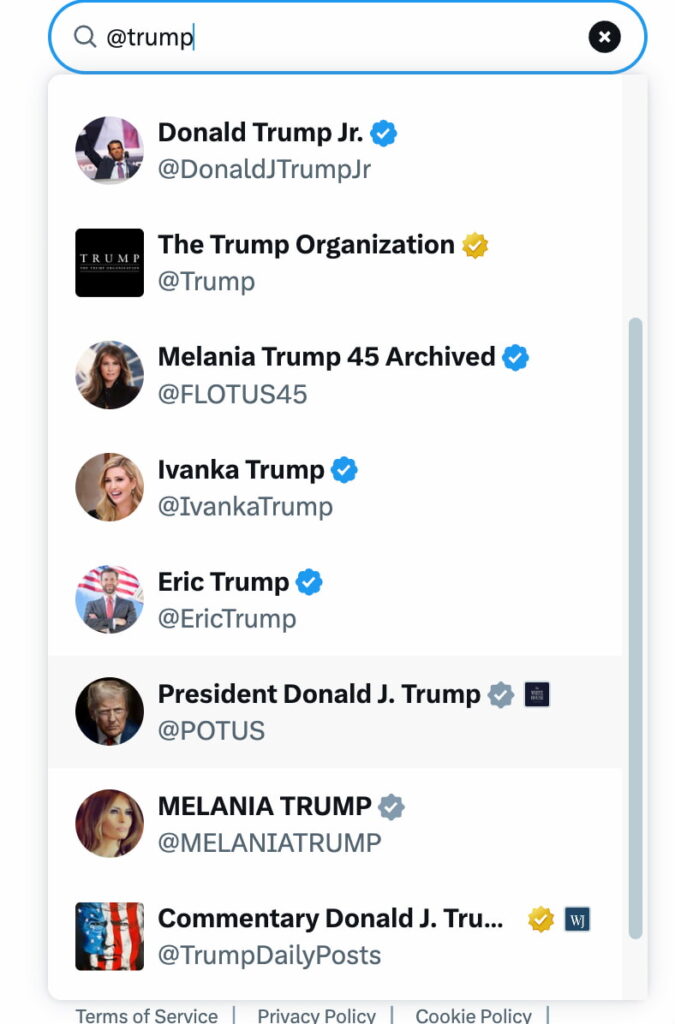
Typos happen, but what if you tag the wrong account? That may put you in an awkward position. There are tons of usernames, and even one misplaced letter can land you with the wrong profile. So, before posting, always check spelling and make sure you’re tagging the right user.
Think About Timing
If you’re adding a tag after posting, try to do it fast. The sooner you tag, the higher the chance the person will see it, and the better your engagement will be. Waiting too long can make your follow-up feel out of place and irrelevant.
Common Mistakes to Avoid
You might be surprised, but even seasoned X users slip up sometimes. Here are a few pitfalls to steer clear of.
Tagging Without Context
Don’t just tag someone and wait for activity. Always give a reason why that person is mentioned and what you expect from them. If this is a new product released by your favorite brand, mention that you think they’ll also find it thrilling. If you want their opinion on something, just put it straight – “What are your thoughts on this, @username?”
Context makes your tag meaningful.
Ignoring Privacy Settings

Some users limit who can tag or mention them. If your tag didn’t work, it might be because of the users’ privacy settings. If you think that’s exactly the case, try a different approach, like a general mention in a new post.
Deleting Too Quickly
Many people find it tempting to delete a post the second they spot a mistake. But don’t rush. If your post has already pulled people into the conversation and they find it engaging and insightful, deleting it might do more harm than good.
When Should You Tag After Posting?

Not every post needs a fix. Here’s when it makes sense:
- You forgot to give some credit for their work or help;
- You’re collaborating with another user;
- You want to engage someone in a discussion;
- A brand or partner wants to boost online visibility.
If none of these apply, you’re probably fine leaving the post as is
Final Thoughts
To bring it to the chase, it’s a common situation when users forget to mention others in their posts. With so many things going on, many just try to post fast, and only minutes later realize they should have included other users in the conversation.
The good news is? This isn’t the end of the world. Even though X doesn’t let you edit posts that were already published, it still lets you mention others afterwards. A quick reply, a quote repost, or a follow-up with a reference to the original tweet and a tag to the desired profile can easily fix it. Just make sure to act quickly so your message still feels relevant.
Next time you miss a tag, don’t sweat it – you’ve got plenty of ways to make it right!